Installation
This guide covers installing MOSAIC and its dependencies, explaining our modular dependency architecture and how to choose what to install.
Why Modular Dependencies?
MOSAIC bridges many different frameworks: RL (CleanRL, RLlib, XuanCe), symbolic AI language models (GPT, Claude), robotics (MuJoCo MPC), and more. Each framework has its own dependencies, and some have conflicting requirements.
Installing everything would:
Cause dependency conflicts (e.g., different PyTorch versions)
Waste disk space (10+ GB for all workers)
Slow down installation unnecessarily
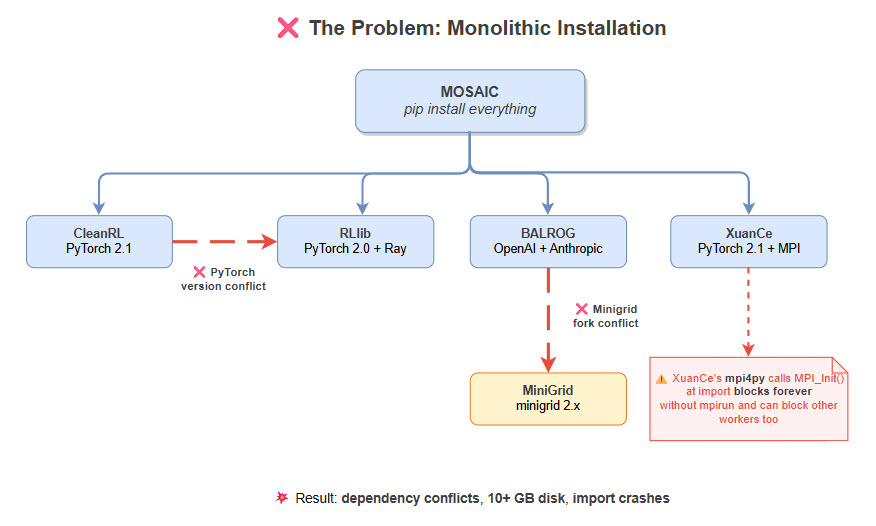
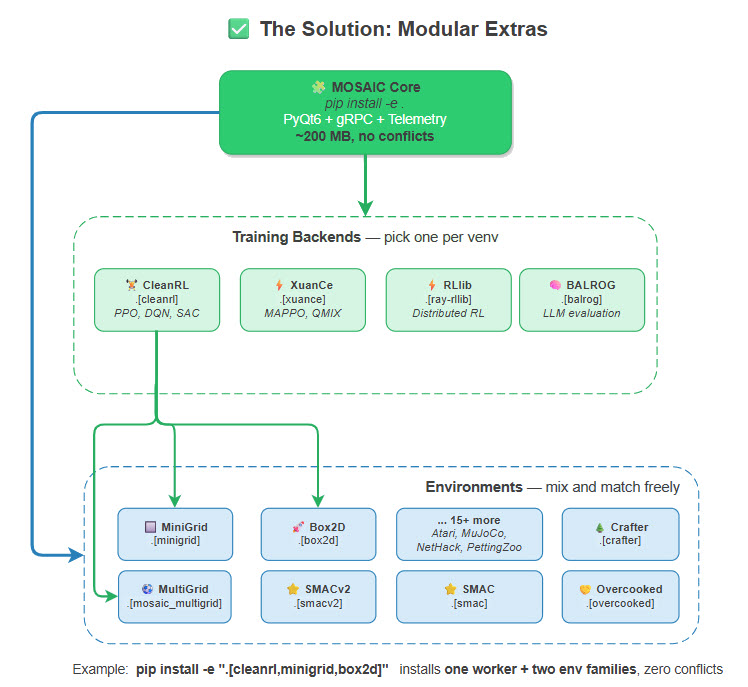
Our solution: install only what you need.
System Requirements
Requirement |
Details |
|---|---|
Python |
3.10, 3.11, or 3.12 (3.13 not yet supported) |
Operating System |
Linux (recommended), macOS, Windows |
GPU |
CUDA-capable GPU optional (for neural training) |
RAM |
8GB minimum, 16GB+ recommended |
Disk Space |
~2GB base, varies by worker selection |
Quick Start Installation
1. Clone and Setup Virtual Environment
# Clone the repository
git clone https://github.com/Abdulhamid97Mousa/MOSAIC.git
cd MOSAIC

# Create virtual environment (Python 3.10-3.12)
python3.11 -m venv .venv
source .venv/bin/activate  # Linux/macOS
# or: .venv\Scripts\activate  # Windows
2. Configure Environment Variables
MOSAIC uses a .env file for configuration. Copy the example file and
customize it for your setup:
cp .env.example .env
The .env file contains all configurable settings with sensible defaults.
Key sections include:
Section |
Description |
|---|---|
Qt Configuration |
Display settings, platform plugins (especially important for WSL) |
Environment Defaults |
Gymnasium settings, episode limits, render FPS for each environment family |
LLM API Keys |
OpenRouter API key, HuggingFace token for gated models |
Weights & Biases |
WANDB API key and project settings for experiment tracking |
SMAC / SMACv2 |
StarCraft II path and difficulty settings |
Important
You must set your API keys in .env to use:
OpenRouter (cloud LLM access): Get your key from https://openrouter.ai/keys
HuggingFace (gated models like Llama): Get your token from https://huggingface.co/settings/tokens
Weights & Biases (experiment tracking): Get your key from https://wandb.ai/authorize
3. Install Core GUI (Minimal)
This installs only what’s needed to launch the GUI:
pip install -e .
This gives you:
PyQt6 visual interface
gRPC infrastructure
Telemetry and replay storage
No training workers or environments
4. Add What You Need
Choose your installation based on your use case:
For single-agent RL training with CleanRL:
# cleanrl = worker (training backend), minigrid = environment family
pip install -e ".[cleanrl,minigrid]"

# Or full isolation via requirements
pip install -r requirements/cleanrl_worker.txt
For multi-agent RL training with MAPPO, QMIX, MADDPG:
pip install -e ".[xuance,mosaic_multigrid]"

# Or via requirements
pip install -r requirements/xuance_worker.txt
For distributed RL training with Ray:
pip install -e ".[ray-rllib]"

# Or via requirements
pip install -r requirements/ray_worker.txt
For benchmarking LLM agents on BabyAI, MiniHack, and Crafter:
pip install -e ".[balrog]"

# For BabyAI tasks, also install BALROG's Minigrid fork
pip install -e ".[balrog,minigrid-balrog]"

# Or via requirements
pip install -r requirements/balrog_worker.txt
For multi-agent LLM reasoning with Theory of Mind:
pip install -r requirements/mosaic_llm_worker.txt
pip install -e 3rd_party/mosaic/llm_worker
Everything for development and testing:
pip install -e ".[full]"

# This installs: all-envs + cleanrl + dev tools
Dependency Architecture
MOSAIC uses two complementary systems for managing optional dependencies, plus a runtime detection layer:
Method |
Use Case |
Command |
|---|---|---|
pyproject.toml |
Quick setup, optional extras |
|
requirements/ |
Full worker isolation, pinned versions |
|
Runtime detection |
GUI discovers what’s installed at startup |
Automatic ( |
pyproject.toml Extras
The [project.optional-dependencies] section in pyproject.toml defines
all installable extras. Each extra maps to a set of PyPI packages:
[project.optional-dependencies]

# ── Environment Families ──────────────────────────────────────────
gymnasium     = ["gymnasium>=1.1.0"]
box2d         = ["gymnasium[box2d]>=1.1.0"]
mujoco        = ["gymnasium[mujoco]>=1.1.0"]
atari         = ["gymnasium[atari]>=1.1.0", "autorom[accept-rom-license]>=0.6.0"]
minigrid      = ["gymnasium>=1.1.0", "minigrid>=2.0.0,<3.0.0"]
pettingzoo    = ["pettingzoo[classic,butterfly,mpe,sisl]>=1.24.0", ...]
vizdoom       = ["vizdoom>=1.2.0,<2.0.0"]
nethack       = ["nle>=0.9.0", "minihack>=0.1.5"]
crafter       = ["crafter>=1.8.0"]
procgen       = ["procgen>=0.10.7"]            # or procgen-mirror for 3.11+
textworld     = ["textworld>=1.6.0"]
babaisai      = ["baba-is-ai @ git+https://github.com/nacloos/baba-is-ai"]
jumanji       = ["jax>=0.4.20", "jaxlib>=0.4.20", ...]
pybullet-drones = ["pybullet>=3.2.5", ...]
openspiel     = ["open-spiel>=1.4.0", "shimmy[openspiel]>=1.3.0"]
mosaic_multigrid = ["mosaic-multigrid==4.4.0"]
multigrid_ini = ["gymnasium>=1.1.0", "pygame>=2.5.0"]
meltingpot    = ["shimmy[meltingpot]>=1.3.0", ...]
overcooked    = ["dill", "gymnasium>=1.1.0", ...]
smac          = ["smac @ git+https://github.com/oxwhirl/smac.git", "pygame>=2.1.0"]
smacv2        = ["smacv2 @ git+https://github.com/oxwhirl/smacv2.git", "pygame>=2.1.0"]
rware         = ["gymnasium>=1.1.0", "pyglet<2.0.0", "networkx>=2.8.0"]

# ── Workers (Training Backends) ──────────────────────────────────
cleanrl       = ["torch>=2.0.0", "tensorboard>=2.11.0", "wandb>=0.22.3", ...]
xuance        = ["torch>=2.0.0", "mpi4py>=3.1.0", ...]
ray-rllib     = ["ray[rllib]>=2.9.0", "torch>=2.0.0", ...]
balrog        = ["omegaconf>=2.3.0", "openai>=1.0.0", "anthropic>=0.18.0", ...]
mctx          = ["jax>=0.4.20", "pgx>=2.0.0", "mctx>=0.0.5", ...]
chat          = ["requests>=2.31.0", "huggingface_hub>=0.20.0", "vllm>=0.6.0"]
mujoco-mpc    = ["mujoco>=3.0.0"]

# ── Convenience Bundles ──────────────────────────────────────────
all-gymnasium = ["mosaic[box2d,mujoco,atari,minigrid]"]
all-envs      = ["mosaic[box2d,mujoco,atari,...,smac,smacv2,rware]"]
full          = ["mosaic[all-envs,cleanrl,dev]"]
Tip
You do not need to install every extra. Pick only what you need.
Note that workers (training backends like cleanrl, xuance) and
environment families (like minigrid, pettingzoo) are independent —
combine one worker with the environments you want:
# cleanrl = worker, minigrid = environment family
pip install -e ".[cleanrl,minigrid]"
requirements/ Directory
For reproducible setups or CI pipelines, use the pinned requirement files.
Each file includes -r base.txt to pull in shared dependencies:
requirements/
├── base.txt               # Core GUI + shared libraries
│
├── # ── Environment Families ──
├── minigrid.txt           # MiniGrid grid-world navigation
├── mosaic_multigrid.txt   # MOSAIC MultiGrid competitive sports
├── multigrid_ini.txt      # INI MultiGrid cooperative exploration
├── pettingzoo.txt         # PettingZoo multi-agent (Chess, Go, MPE)
├── vizdoom.txt            # ViZDoom FPS environments
├── nethack.txt            # NetHack / MiniHack roguelike
├── crafter.txt            # Crafter survival benchmark
├── textworld.txt          # TextWorld interactive fiction
├── babaisai.txt           # BabaIsAI rule-manipulation puzzles
├── meltingpot.txt         # Melting Pot social scenarios
├── overcooked.txt         # Overcooked cooperative cooking
├── smac.txt               # SMAC v1 StarCraft micromanagement
├── smacv2.txt             # SMACv2 procedural StarCraft
├── rware.txt              # RWARE warehouse delivery
│
├── # ── Workers (Training Backends) ──
├── cleanrl_worker.txt     # CleanRL (PPO, DQN, SAC, TD3)
├── xuance_worker.txt      # XuanCe MARL (MAPPO, QMIX, MADDPG)
├── ray_worker.txt         # RLlib distributed training
├── balrog_worker.txt      # BALROG LLM evaluation benchmark
├── llm_worker.txt         # MOSAIC native LLM worker
├── mosaic_llm_worker.txt  # Full LLM worker stack
├── chat.txt               # Chat UI (OpenRouter + vLLM)
└── mujoco_mpc_worker.txt  # MuJoCo MPC controller
Runtime Detection
When you launch MOSAIC, the GUI automatically detects which optional
dependencies are installed using importlib.util.find_spec() — a
non-importing probe that checks if a package exists on sys.path
without executing any module code:
# From gym_gui/app.py — _detect_optional_dependencies()
import importlib.util

checks = {
    "minigrid":          "minigrid",
    "mosaic_multigrid":  "mosaic_multigrid",
    "multigrid_ini":     "multigrid",
    "pettingzoo":        "pettingzoo",
    "atari":             "ale_py",       # ALE = Arcade Learning Environment
    "vizdoom":           "vizdoom",
    "crafter":           "crafter",
    "nethack":           "nle",          # NLE = NetHack Learning Environment
    "smac":              "smac",
    "smacv2":            "smacv2",
    "rware":             "rware",
    "overcooked_ai":     "overcooked_ai_py",
    "cleanrl_worker":    "cleanrl",
    "xuance_worker":     "xuance",
    "ray_worker":        "ray",
    "chat":              "openai",
}

for dep_name, package_name in checks.items():
    deps[dep_name] = importlib.util.find_spec(package_name) is not None
Important
We use find_spec() instead of import because some packages execute
blocking code at import time:
XuanCe calls
from mpi4py import MPIwhich invokesMPI_Init(), this blocks forever when not launched viampirunRay imports TensorFlow, Pydantic, and W&B at module level, adding several seconds of startup delay
The .env file sets MPI4PY_RC_INITIALIZE=0 to prevent MPI
initialization even if XuanCe is accidentally imported.
Additionally, the gym_gui/constants/optional_deps.py module provides
lazy loader functions for workers that need actual imports at runtime:
from gym_gui.constants import (
    is_cleanrl_available,   # bool
    is_vizdoom_available,   # bool
    is_pettingzoo_available,# bool
    is_torch_available,     # bool
    require_cleanrl,        # raises OptionalDependencyError if missing
    require_vizdoom,        # raises OptionalDependencyError if missing
)

# Lazy worker launchers (import on first use)
from gym_gui.constants import get_mjpc_launcher
Environment Family Installation
Install only the environment families you need. Each family is an independent
pyproject.toml extra:
Family |
Install Command |
Environments |
|---|---|---|
Gymnasium Core |
|
Toy Text (FrozenLake, Taxi), Classic Control (CartPole, Pendulum) |
Box2D |
|
LunarLander, BipedalWalker, CarRacing |
MuJoCo |
|
Ant, HalfCheetah, Humanoid, Walker2d, Hopper |
Atari / ALE |
|
Breakout, Pong, SpaceInvaders, Asteroids (128 games) |
MiniGrid |
|
Empty, DoorKey, MultiRoom, RedBlueDoors, LavaGap |
BabyAI |
|
GoTo, Open, Pickup, Unlock, BossLevel (language-grounded) |
ViZDoom |
|
Basic, DeadlyCorridor, DefendTheCenter, Deathmatch |
NetHack / MiniHack |
|
Room, MazeWalk, NetHackChallenge (roguelike) |
Crafter |
|
CrafterReward, CrafterNoReward (open-world survival) |
Procgen |
|
CoinRun, StarPilot, Maze, Heist (16 procedural envs) |
TextWorld |
|
CoinCollector, TreasureHunter, Cooking (text-based) |
BabaIsAI |
|
BabaIsAI-Default (rule-manipulation puzzles) |
Jumanji |
|
Game2048, Tetris, PacMan, Snake, Sudoku (JAX-accelerated) |
PyBullet Drones |
|
HoverAviary, MultiHoverAviary (quadcopter physics) |
PettingZoo Classic |
|
Chess, Go, Connect Four, TicTacToe, Backgammon |
OpenSpiel |
|
Checkers, International Draughts (via Shimmy) |
MOSAIC MultiGrid |
|
Soccer 2v2, Collect, Basketball 3v3 (competitive team sports) |
INI MultiGrid |
|
Empty, LockedHallway, RedBlueDoors (cooperative exploration) |
Melting Pot |
|
CleanUp, Territory, Cooking, PrisonersDilemma (social scenarios) |
Overcooked |
|
CrampedRoom, CoordinationRing (cooperative cooking) |
SMAC |
|
3m, 8m, 2s3z, 5m_vs_6m, MMM2 (StarCraft cooperative) |
SMACv2 |
|
10gen_terran, 10gen_protoss, 10gen_zerg (procedural StarCraft) |
RWARE |
|
tiny/small/medium/large warehouses (cooperative delivery) |
Tip
Convenience bundles let you install groups of families at once:
# All Gymnasium single-agent environments
pip install -e ".[all-gymnasium]"    # = box2d + mujoco + atari + minigrid

# All environment families (single + multi-agent)
pip install -e ".[all-envs]"

# Everything including CleanRL and dev tools
pip install -e ".[full]"
Worker-Specific Installation
CleanRL Worker
Single-file RL implementations: PPO, DQN, SAC, TD3.
# Via pyproject.toml
pip install -e ".[cleanrl]"

# Via requirements (recommended for production)
pip install -r requirements/cleanrl_worker.txt

# Verify
python -c "import torch; print(f'PyTorch {torch.__version__}')"
XuanCe Worker (MARL)
Multi-agent algorithms: MAPPO, QMIX, MADDPG.
pip install -e ".[xuance]"

# Or via requirements
pip install -r requirements/xuance_worker.txt
Warning
XuanCe requires mpi4py which needs MPI libraries:
# Ubuntu/Debian
sudo apt-get install libopenmpi-dev

# macOS
brew install open-mpi
Ray/RLlib Worker
Distributed training with Ray.
pip install -e ".[ray-rllib]"

# Or via requirements
pip install -r requirements/ray_worker.txt
BALROG Worker (LLM Evaluation)
Benchmark for LLM agents on BabyAI, MiniHack, and Crafter.
pip install -e ".[balrog]"

# For BabyAI tasks, also install BALROG's Minigrid fork
pip install -e ".[balrog,minigrid-balrog]"

# Or via requirements
pip install -r requirements/balrog_worker.txt
Note
minigrid-balrog installs a patched Minigrid fork from
BartekCupial/Minigrid.
Do not install both minigrid and minigrid-balrog in the
same environment — they conflict.
MCTX Worker (AlphaZero/MuZero)
GPU-accelerated MCTS training for board games using JAX.
pip install -e ".[mctx]"

# Supports: Chess, Go, Shogi, Connect Four, Othello, Backgammon
Chat / LLM Worker
LLM-based agents using OpenRouter (cloud) or vLLM (local GPU).
pip install -e ".[chat]"

# For local vLLM inference, also install Ollama
curl -fsSL https://ollama.ai/install.sh | sh
ollama pull llama3.2
MuJoCo MPC Worker
Model Predictive Control with MuJoCo physics.
pip install -e ".[mujoco-mpc]"

# The MPC binary is pre-built in 3rd_party/mujoco_mpc_worker/bin/
# Or build from source — see 3rd_party/mujoco_mpc_worker/README.md
Special Setup: StarCraft II (SMAC / SMACv2)
Both SMAC and SMACv2 require the StarCraft II game binary.
1. Download StarCraft II
Download the headless Linux binary from Blizzard’s s2client-proto.
# Download and extract to var/data/ (MOSAIC convention)
cd var/data/
wget https://blzdistsc2-a.akamaihd.net/Linux/SC2.4.10.zip
unzip SC2.4.10.zip
# This creates var/data/StarCraftII/
Install StarCraft II from Battle.net.
2. Set SC2PATH Environment Variable
# Add to your .env file (MOSAIC reads this at startup)
echo 'SC2PATH=/path/to/StarCraftII' >> .env

# MOSAIC default: var/data/StarCraftII/
# See gym_gui/config/paths.py → VAR_SC2_DIR
3. Install SMAC Maps
# SMAC v1 maps (3m, 8m, 2s3z, MMM2, etc.)
pip install -e ".[smac]"
# Maps are bundled in the smac package

# SMACv2 maps (10gen_terran, etc.)
pip install -e ".[smacv2]"
# Maps are bundled in the smacv2 package
Special Setup: Local 3rd-Party Packages
Some environment families install from local source in 3rd_party/
rather than PyPI:
# MOSAIC MultiGrid (competitive team sports)
pip install -e 3rd_party/mosaic_multigrid/

# INI MultiGrid (cooperative exploration)
pip install -e 3rd_party/multigrid-ini/

# Overcooked-AI (cooperative cooking)
pip install -e 3rd_party/overcooked_ai/

# RWARE (warehouse delivery)
pip install -e 3rd_party/robotic-warehouse/
Note
The pyproject.toml extras for these packages list their dependencies
(e.g., gymnasium, pygame), but you still need to pip install -e
the local package to get the actual environment code.
Verifying Installation
Launch the GUI
# Quick launch
python -m gym_gui

# Full launch with trainer daemon (recommended)
./run.sh
If successful, you’ll see the MOSAIC visual interface with the animated space welcome screen. The console will log which optional dependencies were detected:
optional_deps_detected method=find_spec found=12 total=16
Run Tests
# Install dev dependencies
pip install -e ".[dev]"

# Run test suite
pytest gym_gui/tests/

# Run specific tests
pytest gym_gui/tests/test_minigrid_empty_integration.py -v
Check Worker Availability (Python)
from gym_gui.constants import (
    is_cleanrl_available,
    is_vizdoom_available,
    is_pettingzoo_available,
    is_torch_available,
)

print(f"CleanRL:    {is_cleanrl_available()}")
print(f"ViZDoom:    {is_vizdoom_available()}")
print(f"PettingZoo: {is_pettingzoo_available()}")
print(f"PyTorch:    {is_torch_available()}")
Troubleshooting
PyQt6 Display Issues
On headless servers or WSL:
# Install virtual display
sudo apt-get install xvfb

# Run with virtual display
xvfb-run python -m gym_gui
CUDA/PyTorch Issues
If PyTorch doesn’t detect your GPU:
# Reinstall PyTorch with CUDA support
pip install torch --index-url https://download.pytorch.org/whl/cu121
MPI Issues (XuanCe)
If mpi4py fails to install:
# Ubuntu/Debian
sudo apt-get install libopenmpi-dev

# Then reinstall
pip install mpi4py
Tip
MOSAIC sets MPI4PY_RC_INITIALIZE=0 in the .env file to prevent
MPI_Init() from blocking when XuanCe is imported outside of mpirun.
Make sure your .env file includes this setting.
Stockfish (Chess Engine)
Stockfish is a standalone chess engine — it is
not part of PettingZoo. PettingZoo’s Chess environment uses python-chess
for move validation and rendering, but can optionally use Stockfish as a
built-in opponent. If you want Stockfish-powered opponents:
# Ubuntu/Debian
sudo apt-get install stockfish

# macOS
brew install stockfish
Overcooked Python Version
Overcooked-AI requires Python 3.10 only (>=3.10,<3.11). If you need
Overcooked with Python 3.11+, create a separate virtual environment:
python3.10 -m venv .venv-overcooked
source .venv-overcooked/bin/activate
pip install -e ".[overcooked]"
pip install -e 3rd_party/overcooked_ai/
Dependency Conflicts
If you encounter conflicts between workers:
# Create separate environments for conflicting workers
python -m venv .venv-cleanrl
python -m venv .venv-rllib

# Install each worker in its own environment
source .venv-cleanrl/bin/activate
pip install -r requirements/cleanrl_worker.txt
Platform Guides
Next Steps
After installation:
Quick Start: See Quickstart to run your first experiment
Environments: See Environment Families for the full environment catalog
Architecture: See Architecture Overview to understand MOSAIC’s design