Operator Lifecycle
Operators have two distinct execution modes: Manual Mode for interactive exploration and Script Mode for automated experiments. Each mode has its own state machine and signal flow.
Execution Modes
Mode |
Description |
Entry Point |
|---|---|---|
Manual Mode |
User clicks “Reset All” and “Step All” buttons. One step per click. |
Operators Tab > Manual sub-tab |
Script Mode |
User loads a Python script defining operators and seeds. Execution runs automatically across N episodes. |
Operators Tab > Script Experiments sub-tab |
Important
Manual Mode and Script Mode are fully decoupled, they use separate signal paths and state machines. Running a script does not interfere with manual controls, and vice versa.
Manual Mode
State Machine
        %%{init: {"flowchart": {"curve": "linear"}} }%%
graph TD
    START(( )) -->|Operator configured| IDLE
    IDLE -->|Start All clicked| LAUNCHING
    LAUNCHING -->|Subprocess spawned| RUNNING
    RUNNING -->|Step All clicked| STEPPING
    STEPPING -->|Response received| RUNNING
    RUNNING -->|Reset All clicked| RESETTING
    RESETTING -->|Ready response| RUNNING
    RUNNING -->|Stop All clicked| STOPPED
    STEPPING -->|Stop All clicked| STOPPED
    STOPPED --> END(( ))

    style IDLE fill:#6c757d,stroke:#495057,color:#fff
    style LAUNCHING fill:#0d6efd,stroke:#0a58ca,color:#fff
    style RUNNING fill:#198754,stroke:#146c43,color:#fff
    style STEPPING fill:#ffc107,stroke:#cc9a06,color:#000
    style RESETTING fill:#0dcaf0,stroke:#0aa2c0,color:#000
    style STOPPED fill:#dc3545,stroke:#b02a37,color:#fff
Script Mode
Script mode enables automated multi-episode experiments. The user
loads a Python script that defines operator configurations and seed
lists, then the OperatorScriptExecutionManager drives execution
automatically.
State Machine
        %%{init: {"flowchart": {"curve": "linear"}} }%%
graph TD
    START(( )) -->|Script loaded| IDLE
    IDLE -->|Run Experiment clicked| LAUNCHING
    LAUNCHING -->|Subprocess spawned + reset sent| WAITING_READY
    WAITING_READY -->|ready response| STEPPING

    subgraph LOOP ["Paced Step Loop"]
        STEPPING -->|episode_end response| EPISODE_DONE
    end

    EPISODE_DONE -->|All episodes finished| COMPLETED
    EPISODE_DONE -->|Next episode: reset with next seed| WAITING_READY

    WAITING_READY -->|User clicks Stop| STOPPED
    STEPPING -->|User clicks Stop| STOPPED

    style IDLE fill:#6c757d,stroke:#495057,color:#fff
    style LAUNCHING fill:#0d6efd,stroke:#0a58ca,color:#fff
    style WAITING_READY fill:#ffc107,stroke:#cc9a06,color:#000
    style STEPPING fill:#198754,stroke:#146c43,color:#fff
    style EPISODE_DONE fill:#0dcaf0,stroke:#0aa2c0,color:#000
    style COMPLETED fill:#198754,stroke:#146c43,color:#fff
    style STOPPED fill:#dc3545,stroke:#b02a37,color:#fff
    style LOOP fill:none,stroke:#555,stroke-dasharray: 5 5
OperatorScriptExecutionManager
The execution manager is a QObject state machine that owns the
entire automatic execution lifecycle:
class OperatorScriptExecutionManager(QObject):
    # Signals sent to MainWindow for subprocess control
    launch_operator = pyqtSignal(str, object, int)   # op_id, config, seed
    reset_operator = pyqtSignal(str, int)             # op_id, seed
    step_operator = pyqtSignal(str)                   # op_id
    stop_operator = pyqtSignal(str)                   # op_id

    # Signals sent to ScriptExperimentWidget for UI updates
    progress_updated = pyqtSignal(int, int, int)      # episode, total, seed
    experiment_completed = pyqtSignal(int)             # num_episodes
The manager coordinates with MainWindow through signals:
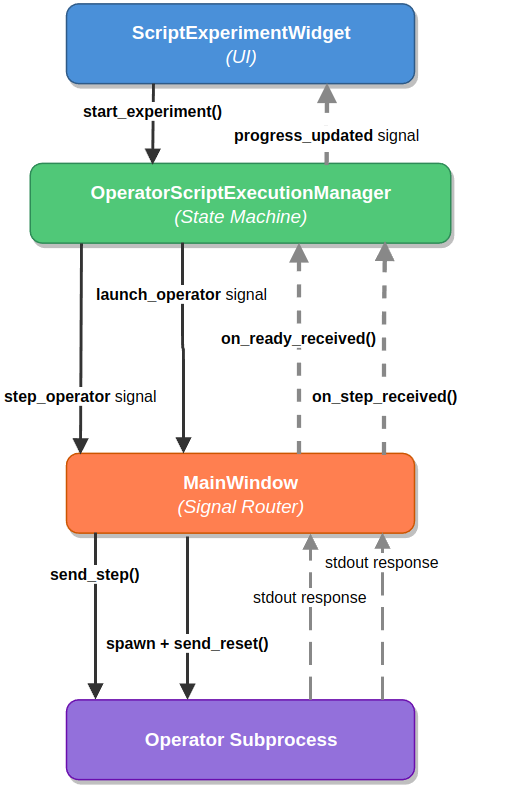
Signal flow between the four components: ScriptExperimentWidget triggers
start_experiment(), the Manager emits launch_operator and
step_operator signals to MainWindow, which spawns the subprocess and
relays send_reset() / send_step() commands. Responses flow back
via stdout, and progress is reported to the UI via progress_updated.
Paced Stepping
A critical design detail: after receiving a step response, the manager
does not immediately request the next step. Instead, it uses
QTimer.singleShot(delay_ms, callback) to insert a small delay:
def on_step_received(self, operator_id: str) -> None:
    if not self._is_running or not self._waiting_for_response:
        return

    def _emit_next_step():
        if self._is_running and self._waiting_for_response:
            self.step_operator.emit(operator_id)

    QTimer.singleShot(self._step_delay_ms, _emit_next_step)
This delay serves a critical purpose: without it, the step loop runs so fast that Qt paint events are starved. The render view would show visual jumps (e.g., step 26 to step 37) because frames are logically rendered but never visually painted by the Qt compositor.
Approach |
Speed |
Visual Quality |
Status |
|---|---|---|---|
Timer spam |
Uncontrolled |
Broken (flooding) |
Abandoned |
Immediate re-emit |
Maximum |
Jittery (skips frames) |
Abandoned |
Paced stepping |
Configurable |
Smooth |
Current |
The step delay is configurable via a UI spinbox:
0 ms: fastest (may skip frames visually)
50 ms: smooth frame-by-frame rendering (default)
200 ms: slow-motion playback for analysis
1000 ms: one step per second
Warning
Never use QApplication.processEvents() for step pacing.
It causes reentrancy issues and unpredictable behavior.
QTimer.singleShot is the Qt-idiomatic solution.
Episode Advancement
When an episode ends, the manager advances to the next seed:
def on_episode_ended(
    self, operator_id: str, terminated: bool, truncated: bool
) -> None:
    self._current_episode += 1

    if self._current_episode >= self._total_episodes:
        self.experiment_completed.emit(self._total_episodes)
        return

    next_seed = self._seeds[self._current_episode]
    self.reset_operator.emit(operator_id, next_seed)
Seed modes:
Procedural: different seed per episode (tests generalization)
Fixed: same seed every episode (isolates agent behavior)
Script Format
Experiment scripts are Python files that define operator configurations and execution parameters:
# simple_random_experiment.py

operators = [
    {
        "id": "random_1",
        "name": "Random Agent",
        "type": "random",
        "worker_id": "random_worker",
        "env_name": "minigrid",
        "task": "MiniGrid-Empty-8x8-v0",
    },
]

execution = {
    "num_episodes": 10,
    "seeds": [1000, 1001, 1002, 1003, 1004,
              1005, 1006, 1007, 1008, 1009],
    "step_delay_ms": 50,
    "env_mode": "procedural",
}
Scripts are loaded via compile() + sandboxed namespace execution
(not importlib, which can cause import chain hangs on Linux):
with open(script_path) as f:
    code = compile(f.read(), script_path, "exec")
namespace = {}
exec(code, namespace)
operators = namespace["operators"]
execution = namespace.get("execution", {})
Telemetry Output
Operator telemetry is written to var/operators/telemetry/:
var/operators/telemetry/
├── random_minigrid_{run_id}_steps.jsonl    # Per-step data
└── random_minigrid_{run_id}_episodes.jsonl # Per-episode summaries
Each line is a JSON object with step index, action, reward, termination status, and optional render payload.