Overview
MOSAIC is built on a layered architecture that separates concerns and enables extensibility.
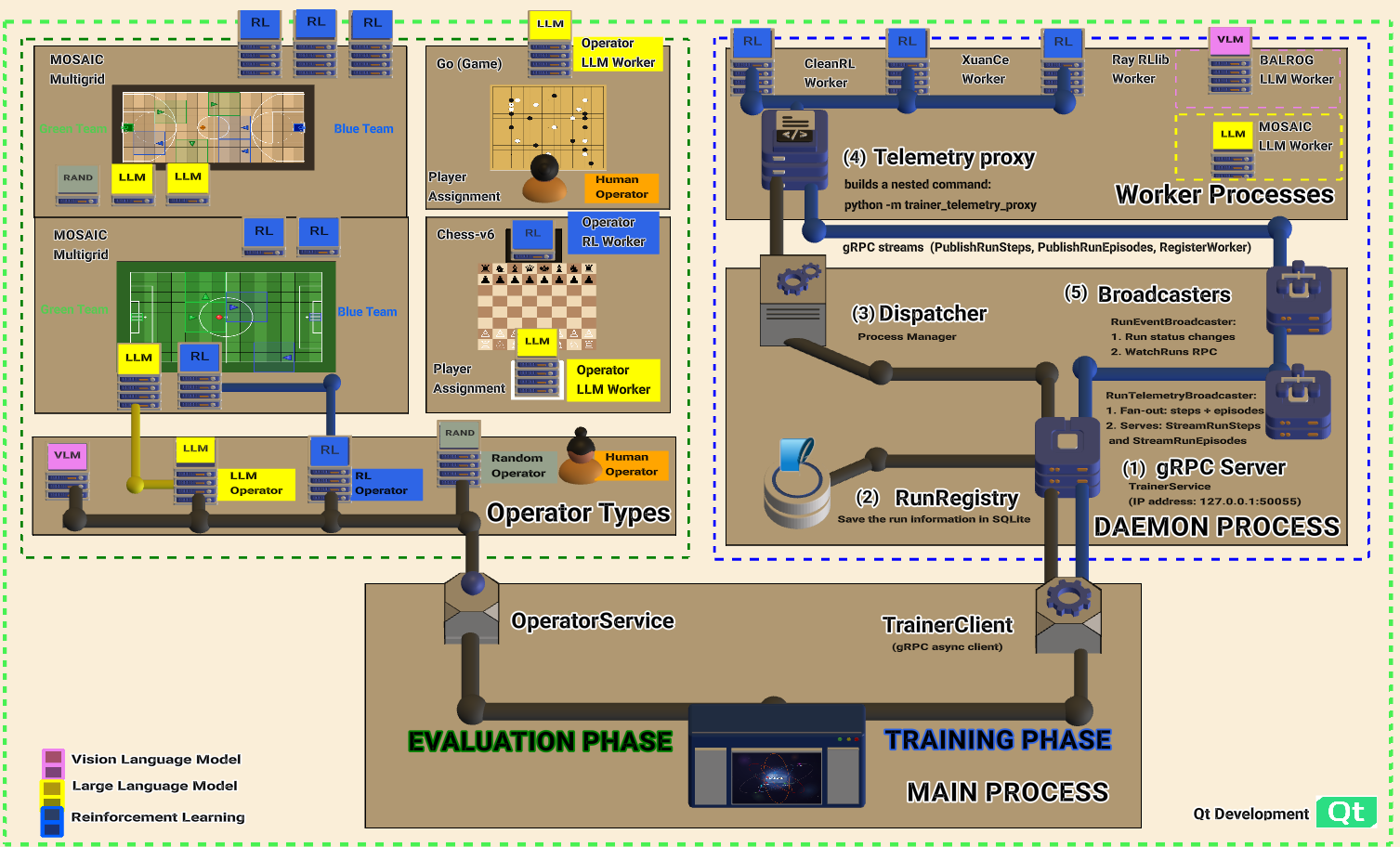
Full architecture: Evaluation Phase (left), Training Phase (right), Daemon Process (gRPC Server, RunRegistry, Dispatcher, Broadcasters), and Worker Processes (CleanRL, XuanCe, Ray RLlib, BALROG, MOSAIC LLM).
System Layers
Layer |
Key Components |
|---|---|
Visual Layer |
MainWindow, ControlPanel, RenderTabs, AdvancedConfigTab |
Service Layer |
PolicyMappingService, ActorService, TelemetryService, OperatorService, SessionSeedManager, StorageRecorderService |
Controller Layer |
SessionController, HumanInputController, InteractionController, LiveTelemetryController |
Adapter Layer |
EnvironmentAdapter (base), PettingZooAdapter, ALEAdapter, MiniGridAdapter, ViZDoomAdapter, SMACAdapter, and 50+ environment-specific adapters |
Worker Layer (gRPC/IPC) |
CleanRL, XuanCe, RLlib, BALROG, MOSAIC LLM, Chess LLM |
Fast Lane (Shared Memory) |
FastLaneWriter, FastLaneReader, FastLaneConsumer, SPSC ring buffer for real-time frame delivery |
Visual Layer
The visual layer provides the user interface built with PyQt6. The screenshot below shows the four main regions of the MOSAIC Qt Shell, each highlighted with a distinct colour:
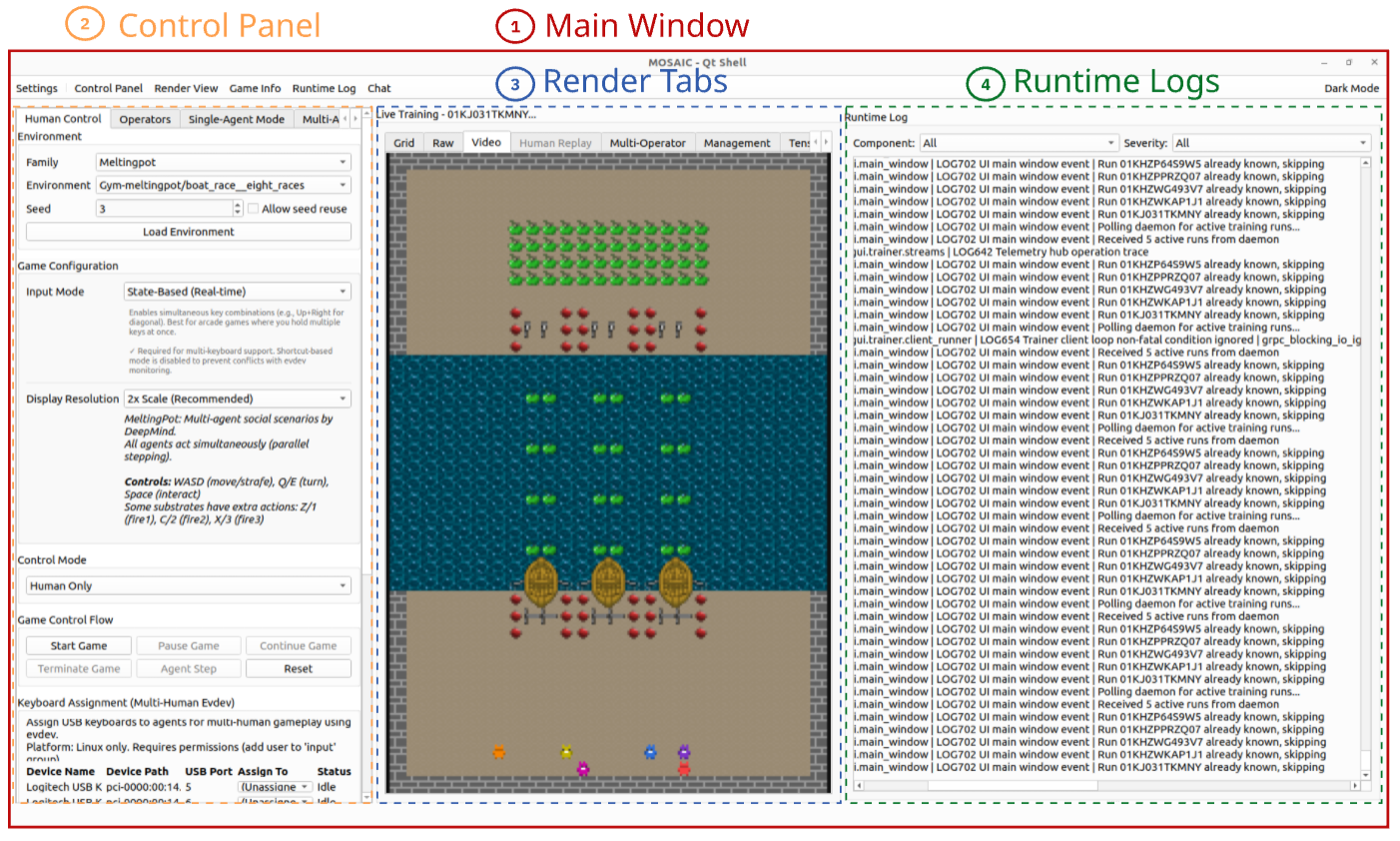
Annotated screenshot of the MOSAIC Qt Shell showing all four visual regions.
Colour |
Region |
Description |
|---|---|---|
| ● | Main Window |
The top-level application shell ( |
| ● | Control Panel |
Left sidebar ( |
| ● | Render Tabs |
Centre area ( |
| ● | Runtime Logs |
Right panel ( |
Component summary:
MainWindow: Application shell with tab management and menu bar
ControlPanel: Environment selection and actor configuration
RenderTabs: Display environment renders (RGB, ASCII, etc.)
RuntimeLogPanel: Filterable structured log viewer
AdvancedConfigTab: Fine-grained experiment configuration (accessible via the Settings menu)
Service Layer
Services provide business logic independent of the UI:
PolicyMappingService: Per-agent policy binding with paradigm awareness and link groups for one-to-one and one-to-many policy mappings in multi-agent RL
ActorService: Actor registration and action selection — see Actors
TelemetryService: Aggregates telemetry events and forwards to storage backends
OperatorService: Multi-agent environment orchestration during evaluation
SessionSeedManager: Deterministic seeding across Python, NumPy, and Qt for reproducibility
StorageRecorderService: HDF5-based session recording and replay
ServiceLocator: Central registry for service discovery
Controller Layer
Controllers coordinate between services and the UI via Qt signals:
SessionController: Manages the adapter lifecycle and evaluation loop
HumanInputController: Captures keyboard and mouse input for human agents
InteractionController: Abstract base with environment-specific subclasses (Box2D, TurnBased, ALE, ViZDoom, SMAC, Procgen, Jumanji)
LiveTelemetryController: Real-time telemetry display and updates
Adapter Layer
Adapters provide a unified EnvironmentAdapter interface to different environment types.
MOSAIC uses an adapter factory pattern to instantiate the correct adapter at runtime:
EnvironmentAdapter: Abstract base class defining the step/reset/render contract
PettingZooAdapter: PettingZoo multi-agent environments (AEC and Parallel)
ALEAdapter: Atari 2600 games via the Arcade Learning Environment
MiniGridAdapter: Procedural grid-world navigation (25+ variants)
BabyAIAdapter: Language-grounded instruction following (35+ variants)
ViZDoomAdapter: Doom-based first-person visual RL
SMACAdapter / SMACv2Adapter: StarCraft Multi-Agent Challenge
JumanjiAdapter: JAX-accelerated environments (20+ variants)
And 50+ more covering Gymnasium, Box2D, MuJoCo, Crafter, MiniHack, NetHack, TextWorld, Procgen, Overcooked, RWARE, Melting Pot, PyBullet Drones, and others
Worker Layer
External training and inference backends communicate via gRPC/IPC:
CleanRL: Single-agent RL (PPO, DQN, SAC, TD3, DDPG, C51, Rainbow)
XuanCe: Multi-agent RL (MAPPO, QMIX, MADDPG, VDN, COMA)
RLlib: Distributed RL with Ray (PPO, IMPALA, APPO)
BALROG: Single-agent LLM benchmarking (MiniGrid, BabyAI, MiniHack, Crafter)
MOSAIC LLM: Multi-agent LLM with coordination strategies and Theory of Mind
Chess LLM: LLM chess play with multi-turn dialog
Fast Lane
The Fast Lane provides real-time frame delivery from workers to the GUI via a shared-memory SPSC ring buffer, bypassing the gRPC/SQLite slow lane for rendering. Key components:
FastLaneWriter / FastLaneReader: Shared-memory ring buffer with seqlock semantics
FastLaneConsumer: Qt-side poller that converts shared-memory frames to
QImagetile_frames(): Composites vectorized environment frames into a single image
worker_helpers: Injects fast-lane environment variables into worker subprocess launch
See the Overview section for the full rendering architecture.