Installation
This guide covers installing MOSAIC and its dependencies, explaining our modular dependency architecture and how to choose what to install.
Why Modular Dependencies?
MOSAIC bridges many different frameworks: RL (CleanRL, RLlib, XuanCe), symbolic AI language models (GPT, Claude), robotics (MuJoCo MPC), and more. Each framework has its own dependencies, and some have conflicting requirements.
Installing everything would:
Cause dependency conflicts (e.g., different PyTorch versions)
Waste disk space (10+ GB for all workers)
Slow down installation unnecessarily
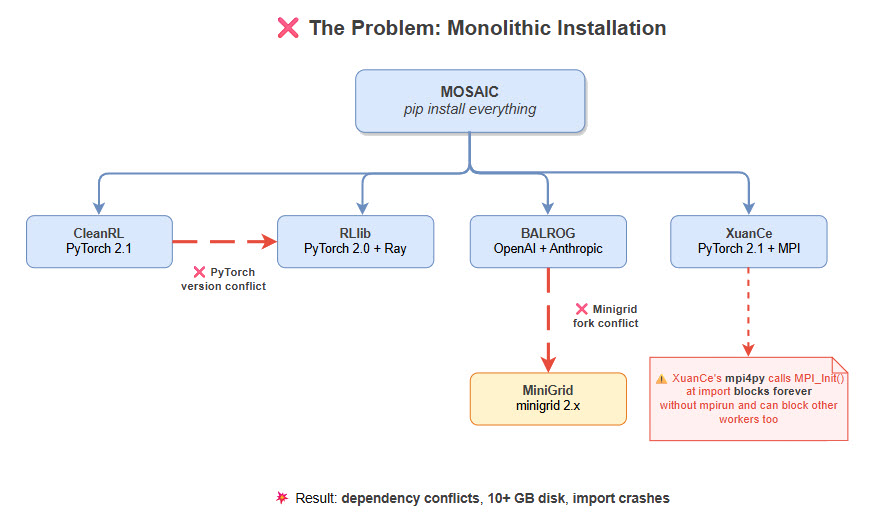
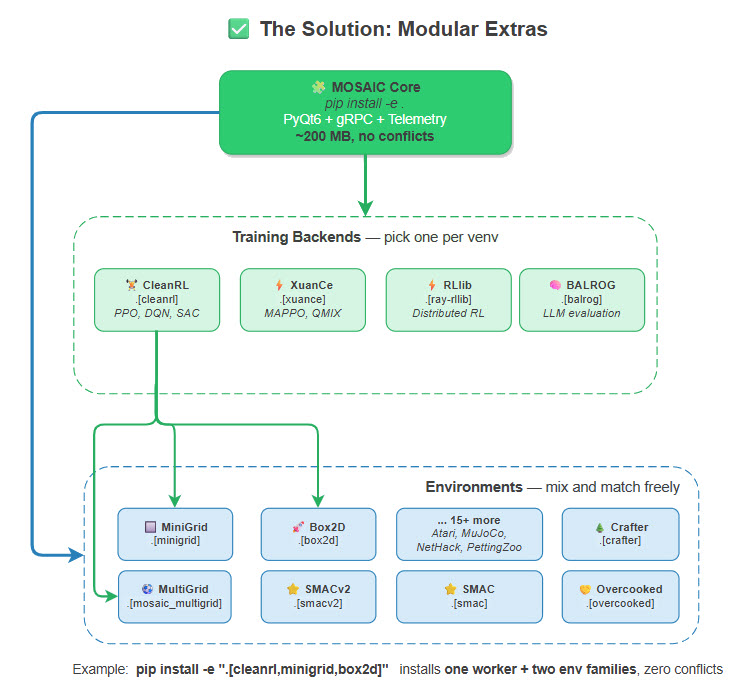
Our solution: install only what you need.
System Requirements
Requirement |
Details |
|---|---|
Python |
3.10, 3.11, or 3.12 (3.13 not yet supported) |
Operating System |
Linux (recommended), macOS, Windows |
GPU |
CUDA-capable GPU optional (for neural training) |
RAM |
8GB minimum, 16GB+ recommended |
Disk Space |
~2GB base, varies by worker selection |
Quick Start Installation
1. Clone and Setup Virtual Environment
# Clone the repository
git clone https://github.com/Abdulhamid97Mousa/MOSAIC.git
cd MOSAIC

# Create virtual environment (Python 3.10-3.12)
python3.11 -m venv .venv
source .venv/bin/activate  # Linux/macOS
# or: .venv\Scripts\activate  # Windows
2. Configure Environment Variables
MOSAIC uses a .env file for configuration. Copy the example file and
customize it for your setup:
cp .env.example .env
The .env file contains all configurable settings with sensible defaults.
Key sections include:
Section |
Description |
|---|---|
Qt Configuration |
Display settings, platform plugins (especially important for WSL) |
Environment Defaults |
Gymnasium settings, episode limits, render FPS for each environment family |
LLM API Keys |
OpenRouter API key, HuggingFace token for gated models |
Weights & Biases |
WANDB API key and project settings for experiment tracking |
SMAC / SMACv2 |
StarCraft II path and difficulty settings |
Important
You must set your API keys in .env to use:
OpenRouter (cloud LLM access): Get your key from https://openrouter.ai/keys
HuggingFace (gated models like Llama): Get your token from https://huggingface.co/settings/tokens
Weights & Biases (experiment tracking): Get your key from https://wandb.ai/authorize
3. Install Core GUI (Minimal)
This installs only what’s needed to launch the GUI:
pip install -e .
This gives you:
PyQt6 visual interface
gRPC infrastructure
Telemetry and replay storage
No training workers or environments
4. Add What You Need
Choose your installation based on your use case:
For single-agent RL training with CleanRL:
# cleanrl = worker (training backend), minigrid = environment family
pip install -e ".[cleanrl,minigrid]"

# Or full isolation via requirements
pip install -r requirements/cleanrl_worker.txt
For multi-agent RL training with MAPPO, QMIX, MADDPG:
pip install -e ".[xuance,mosaic_multigrid]"

# Or via requirements
pip install -r requirements/xuance_worker.txt
For distributed RL training with Ray:
pip install -e ".[ray-rllib]"

# Or via requirements
pip install -r requirements/ray_worker.txt
For benchmarking LLM agents on BabyAI, MiniHack, and Crafter:
pip install -e ".[balrog]"

# For BabyAI tasks, also install BALROG's Minigrid fork
pip install -e ".[balrog,minigrid-balrog]"

# Or via requirements
pip install -r requirements/balrog_worker.txt
For multi-agent LLM reasoning with Theory of Mind:
pip install -r requirements/mosaic_llm_worker.txt
pip install -e 3rd_party/workers/mosaic/llm_worker
For vision-language model agents with image observations:
pip install -r requirements/mosaic_vlm_worker.txt
pip install -e 3rd_party/workers/mosaic/vlm_worker
For random and passive (noop) baseline agents:
pip install -e 3rd_party/workers/mosaic/random_worker
pip install -e 3rd_party/workers/mosaic/passive_worker
pip install -e 3rd_party/workers/mosaic/human_worker
Everything for development and testing:
pip install -e ".[full]"

# This installs: all-envs + cleanrl + dev tools
Dependency Architecture
MOSAIC uses two complementary systems for managing optional dependencies, plus a runtime detection layer:
Method |
Use Case |
Command |
|---|---|---|
pyproject.toml |
Quick setup, optional extras |
|
requirements/ |
Full worker isolation, pinned versions |
|
Runtime detection |
GUI discovers what’s installed at startup |
Automatic ( |
pyproject.toml Extras
The [project.optional-dependencies] section in pyproject.toml defines
all installable extras. Each extra maps to a set of PyPI packages:
[project.optional-dependencies]

# ── Environment Families ──────────────────────────────────────────
gymnasium     = ["gymnasium>=1.1.0"]
box2d         = ["gymnasium[box2d]>=1.1.0"]
mujoco        = ["gymnasium[mujoco]>=1.1.0"]
atari         = ["gymnasium[atari]>=1.1.0", "autorom[accept-rom-license]>=0.6.0"]
minigrid      = ["gymnasium>=1.1.0", "minigrid>=2.0.0,<3.0.0"]
pettingzoo    = ["pettingzoo[classic,butterfly,mpe,sisl]>=1.24.0", ...]
vizdoom       = ["vizdoom>=1.2.0,<2.0.0"]
nethack       = ["nle>=0.9.0", "minihack>=0.1.5"]
crafter       = ["crafter>=1.8.0"]
procgen       = ["procgen>=0.10.7"]            # or procgen-mirror for 3.11+
textworld     = ["textworld>=1.6.0"]
babaisai      = ["baba-is-ai @ git+https://github.com/nacloos/baba-is-ai"]
jumanji       = ["jax>=0.4.20", "jaxlib>=0.4.20", ...]
pybullet-drones = ["pybullet>=3.2.5", ...]
openspiel     = ["open-spiel>=1.4.0", "shimmy[openspiel]>=1.3.0"]
mosaic_multigrid = ["mosaic-multigrid==4.4.0"]
multigrid_ini = ["gymnasium>=1.1.0", "pygame>=2.5.0"]
meltingpot    = ["shimmy[meltingpot]>=1.3.0", ...]
overcooked    = ["dill", "gymnasium>=1.1.0", ...]
smac          = ["smac @ git+https://github.com/oxwhirl/smac.git", "pygame>=2.1.0"]
smacv2        = ["smacv2 @ git+https://github.com/oxwhirl/smacv2.git", "pygame>=2.1.0"]
rware         = ["gymnasium>=1.1.0", "pyglet<2.0.0", "networkx>=2.8.0"]

# ── Workers (Training Backends) ──────────────────────────────────
cleanrl       = ["torch>=2.0.0", "tensorboard>=2.11.0", "wandb>=0.22.3", ...]
xuance        = ["torch>=2.0.0", "mpi4py>=3.1.0", ...]
ray-rllib     = ["ray[rllib]>=2.9.0", "torch>=2.0.0", ...]
balrog        = ["omegaconf>=2.3.0", "openai>=1.0.0", "anthropic>=0.18.0", ...]
mctx          = ["jax>=0.4.20", "pgx>=2.0.0", "mctx>=0.0.5", ...]
chat          = ["requests>=2.31.0", "huggingface_hub>=0.20.0", "vllm>=0.6.0"]
mujoco-mpc    = ["mujoco>=3.0.0"]

# ── Convenience Bundles ──────────────────────────────────────────
all-gymnasium = ["mosaic[box2d,mujoco,atari,minigrid]"]
all-envs      = ["mosaic[box2d,mujoco,atari,...,smac,smacv2,rware]"]
full          = ["mosaic[all-envs,cleanrl,dev]"]
Tip
You do not need to install every extra. Pick only what you need.
Note that workers (training backends like cleanrl, xuance) and
environment families (like minigrid, pettingzoo) are independent —
combine one worker with the environments you want:
# cleanrl = worker, minigrid = environment family
pip install -e ".[cleanrl,minigrid]"
requirements/ Directory
For reproducible setups or CI pipelines, use the pinned requirement files.
Each file includes -r base.txt to pull in shared dependencies:
requirements/
├── base.txt               # Core GUI + shared libraries
│
├── # ── Environment Families ──
├── minigrid.txt           # MiniGrid grid-world navigation
├── mosaic_multigrid.txt   # MOSAIC MultiGrid competitive sports
├── multigrid_ini.txt      # INI MultiGrid cooperative exploration
├── pettingzoo.txt         # PettingZoo multi-agent (Chess, Go, MPE)
├── vizdoom.txt            # ViZDoom FPS environments
├── nethack.txt            # NetHack / MiniHack roguelike
├── crafter.txt            # Crafter survival benchmark
├── textworld.txt          # TextWorld interactive fiction
├── babaisai.txt           # BabaIsAI rule-manipulation puzzles
├── meltingpot.txt         # Melting Pot social scenarios
├── overcooked.txt         # Overcooked cooperative cooking
├── smac.txt               # SMAC v1 StarCraft micromanagement
├── smacv2.txt             # SMACv2 procedural StarCraft
├── rware.txt              # RWARE warehouse delivery
│
├── # ── Workers (Training Backends) ──
├── cleanrl_worker.txt     # CleanRL (PPO, DQN, SAC, TD3)
├── xuance_worker.txt      # XuanCe MARL (MAPPO, QMIX, MADDPG)
├── ray_worker.txt         # RLlib distributed training
├── balrog_worker.txt      # BALROG LLM evaluation benchmark
├── llm_worker.txt         # MOSAIC native LLM worker
├── mosaic_llm_worker.txt  # Full LLM worker stack
├── mosaic_vlm_worker.txt  # MOSAIC VLM worker (vision-language)
├── mosaic_random_worker.txt # MOSAIC Random baseline worker
├── mosaic_passive_worker.txt # MOSAIC Passive baseline worker
├── chat.txt               # Chat UI (OpenRouter + vLLM)
└── mujoco_mpc_worker.txt  # MuJoCo MPC controller
Runtime Detection
When you launch MOSAIC, the GUI automatically detects which optional
dependencies are installed using importlib.util.find_spec() — a
non-importing probe that checks if a package exists on sys.path
without executing any module code:
# From gym_gui/app.py — _detect_optional_dependencies()
import importlib.util

checks = {
    "minigrid":          "minigrid",
    "mosaic_multigrid":  "mosaic_multigrid",
    "multigrid_ini":     "multigrid",
    "pettingzoo":        "pettingzoo",
    "atari":             "ale_py",       # ALE = Arcade Learning Environment
    "vizdoom":           "vizdoom",
    "crafter":           "crafter",
    "nethack":           "nle",          # NLE = NetHack Learning Environment
    "smac":              "smac",
    "smacv2":            "smacv2",
    "rware":             "rware",
    "overcooked_ai":     "overcooked_ai_py",
    "cleanrl_worker":    "cleanrl",
    "xuance_worker":     "xuance",
    "ray_worker":        "ray",
    "chat":              "openai",
}

for dep_name, package_name in checks.items():
    deps[dep_name] = importlib.util.find_spec(package_name) is not None
Important
We use find_spec() instead of import because some packages execute
blocking code at import time:
XuanCe calls
from mpi4py import MPIwhich invokesMPI_Init(), this blocks forever when not launched viampirunRay imports TensorFlow, Pydantic, and W&B at module level, adding several seconds of startup delay
The .env file sets MPI4PY_RC_INITIALIZE=0 to prevent MPI
initialization even if XuanCe is accidentally imported.
Additionally, the gym_gui/constants/optional_deps.py module provides
lazy loader functions for workers that need actual imports at runtime:
from gym_gui.constants import (
    is_cleanrl_available,   # bool
    is_vizdoom_available,   # bool
    is_pettingzoo_available,# bool
    is_torch_available,     # bool
    require_cleanrl,        # raises OptionalDependencyError if missing
    require_vizdoom,        # raises OptionalDependencyError if missing
)

# Lazy worker launchers (import on first use)
from gym_gui.constants import get_mjpc_launcher
Environment Family Installation
Install only the environment families you need. Each family is an independent
pyproject.toml extra:
Family |
Install Command |
Environments |
|---|---|---|
Gymnasium Core |
|
Toy Text (FrozenLake, Taxi), Classic Control (CartPole, Pendulum) |
Box2D |
|
LunarLander, BipedalWalker, CarRacing |
MuJoCo |
|
Ant, HalfCheetah, Humanoid, Walker2d, Hopper |
Atari / ALE |
|
Breakout, Pong, SpaceInvaders, Asteroids (128 games) |
MiniGrid |
|
Empty, DoorKey, MultiRoom, RedBlueDoors, LavaGap |
BabyAI |
|
GoTo, Open, Pickup, Unlock, BossLevel (language-grounded) |
ViZDoom |
|
Basic, DeadlyCorridor, DefendTheCenter, Deathmatch |
NetHack / MiniHack |
|
Room, MazeWalk, NetHackChallenge (roguelike) |
Crafter |
|
CrafterReward, CrafterNoReward (open-world survival) |
Procgen |
|
CoinRun, StarPilot, Maze, Heist (16 procedural envs) |
TextWorld |
|
CoinCollector, TreasureHunter, Cooking (text-based) |
BabaIsAI |
|
BabaIsAI-Default (rule-manipulation puzzles) |
Jumanji |
|
Game2048, Tetris, PacMan, Snake, Sudoku (JAX-accelerated) |
PyBullet Drones |
|
HoverAviary, MultiHoverAviary (quadcopter physics) |
PettingZoo Classic |
|
Chess, Go, Connect Four, TicTacToe, Backgammon |
OpenSpiel |
|
Checkers, International Draughts (via Shimmy) |
MOSAIC MultiGrid |
|
Soccer 2v2, Collect, Basketball 3v3 (competitive team sports) |
INI MultiGrid |
|
Empty, LockedHallway, RedBlueDoors (cooperative exploration) |
Melting Pot |
|
CleanUp, Territory, Cooking, PrisonersDilemma (social scenarios) |
Overcooked |
|
CrampedRoom, CoordinationRing (cooperative cooking) |
SMAC |
|
3m, 8m, 2s3z, 5m_vs_6m, MMM2 (StarCraft cooperative) |
SMACv2 |
|
10gen_terran, 10gen_protoss, 10gen_zerg (procedural StarCraft) |
RWARE |
|
tiny/small/medium/large warehouses (cooperative delivery) |
Tip
Convenience bundles let you install groups of families at once:
# All Gymnasium single-agent environments
pip install -e ".[all-gymnasium]"    # = box2d + mujoco + atari + minigrid

# All environment families (single + multi-agent)
pip install -e ".[all-envs]"

# Everything including CleanRL and dev tools
pip install -e ".[full]"
Worker-Specific Installation
CleanRL Worker
Single-file RL implementations: PPO, DQN, SAC, TD3.
# Via pyproject.toml
pip install -e ".[cleanrl]"

# Via requirements (recommended for production)
pip install -r requirements/cleanrl_worker.txt

# Verify
python -c "import torch; print(f'PyTorch {torch.__version__}')"
XuanCe Worker (MARL)
Multi-agent algorithms: MAPPO, QMIX, MADDPG.
pip install -e ".[xuance]"

# Or via requirements
pip install -r requirements/xuance_worker.txt
Warning
XuanCe requires mpi4py which needs MPI libraries:
# Ubuntu/Debian
sudo apt-get install libopenmpi-dev

# macOS
brew install open-mpi
Ray/RLlib Worker
Distributed training with Ray.
pip install -e ".[ray-rllib]"

# Or via requirements
pip install -r requirements/ray_worker.txt
BALROG Worker (LLM Evaluation)
Benchmark for LLM agents on BabyAI, MiniHack, and Crafter.
pip install -e ".[balrog]"

# For BabyAI tasks, also install BALROG's Minigrid fork
pip install -e ".[balrog,minigrid-balrog]"

# Or via requirements
pip install -r requirements/balrog_worker.txt
Note
minigrid-balrog installs a patched Minigrid fork from
BartekCupial/Minigrid.
Do not install both minigrid and minigrid-balrog in the
same environment — they conflict.
MCTX Worker (AlphaZero/MuZero)
GPU-accelerated MCTS training for board games using JAX.
pip install -e ".[mctx]"

# Supports: Chess, Go, Shogi, Connect Four, Othello, Backgammon
Chat / LLM Worker
LLM-based agents using OpenRouter (cloud) or vLLM (local GPU).
pip install -e ".[chat]"

# For local vLLM inference, also install Ollama
curl -fsSL https://ollama.ai/install.sh | sh
ollama pull llama3.2
MOSAIC Native Workers
MOSAIC ships five native worker packages in 3rd_party/workers/mosaic/.
These cover human, LLM, VLM, random-baseline, and passive-baseline paradigms:
# Human Worker (human-in-the-loop action selection via GUI)
pip install -e 3rd_party/workers/mosaic/human_worker/

# LLM Worker (multi-agent LLM coordination with Theory of Mind)
pip install -r requirements/mosaic_llm_worker.txt
pip install -e 3rd_party/workers/mosaic/llm_worker/

# VLM Worker (vision-language model agents with image observations)
pip install -r requirements/mosaic_vlm_worker.txt
pip install -e 3rd_party/workers/mosaic/vlm_worker/

# Random Worker (uniform random action baseline)
pip install -r requirements/mosaic_random_worker.txt
pip install -e 3rd_party/workers/mosaic/random_worker/

# Passive Worker (deterministic noop/still baseline)
pip install -r requirements/mosaic_passive_worker.txt
pip install -e 3rd_party/workers/mosaic/passive_worker/
Worker |
Description |
Requirements File |
|---|---|---|
|
Human-in-the-loop action selection via GUI clicks |
(no extra deps) |
|
Multi-agent LLM coordination with Theory of Mind. Supports OpenRouter, OpenAI, Anthropic, and local vLLM. |
|
|
Vision-Language Model agents with image observations. Fork of LLM Worker with vision support. |
|
|
Uniform random action selection baseline. Deterministic seeding for reproducibility. |
|
|
Deterministic do-nothing (noop/still) baseline agent. |
|
Tip
The LLM and VLM workers require API keys. Set them in your .env file
(see the API Keys section above).
MuJoCo MPC Worker
Model Predictive Control with MuJoCo physics.
pip install -e ".[mujoco-mpc]"

# The MPC binary is pre-built in 3rd_party/workers/mujoco_mpc_worker/bin/
# Or build from source — see 3rd_party/workers/mujoco_mpc_worker/README.md
Special Setup: StarCraft II (SMAC / SMACv2)
Both SMAC and SMACv2 require the StarCraft II game binary.
1. Download StarCraft II
Download the headless Linux binary from Blizzard’s s2client-proto.
# Download and extract to var/data/ (MOSAIC convention)
cd var/data/
wget https://blzdistsc2-a.akamaihd.net/Linux/SC2.4.10.zip
unzip SC2.4.10.zip
# This creates var/data/StarCraftII/
Install StarCraft II from Battle.net.
2. Set SC2PATH Environment Variable
# Add to your .env file (MOSAIC reads this at startup)
echo 'SC2PATH=/path/to/StarCraftII' >> .env

# MOSAIC default: var/data/StarCraftII/
# See gym_gui/config/paths.py → VAR_SC2_DIR
3. Install SMAC Maps
# SMAC v1 maps (3m, 8m, 2s3z, MMM2, etc.)
pip install -e ".[smac]"
# Maps are bundled in the smac package

# SMACv2 maps (10gen_terran, etc.)
pip install -e ".[smacv2]"
# Maps are bundled in the smacv2 package
Special Setup: Local 3rd-Party Packages
Some environment families and workers install from local source in 3rd_party/ (workers, environments, tools)
rather than PyPI:
# MOSAIC MultiGrid (competitive team sports)
pip install -e 3rd_party/environments/mosaic_multigrid/

# INI MultiGrid (cooperative exploration)
pip install -e 3rd_party/environments/multigrid-ini/

# Overcooked-AI (cooperative cooking)
pip install -e 3rd_party/environments/overcooked_ai/

# RWARE (warehouse delivery)
pip install -e 3rd_party/environments/robotic-warehouse/

# MOSAIC Native Workers (see "MOSAIC Native Workers" section above)
pip install -e 3rd_party/workers/mosaic/human_worker/
pip install -r requirements/mosaic_llm_worker.txt && pip install -e 3rd_party/workers/mosaic/llm_worker/
pip install -r requirements/mosaic_vlm_worker.txt && pip install -e 3rd_party/workers/mosaic/vlm_worker/
pip install -r requirements/mosaic_random_worker.txt && pip install -e 3rd_party/workers/mosaic/random_worker/
pip install -r requirements/mosaic_passive_worker.txt && pip install -e 3rd_party/workers/mosaic/passive_worker/
Note
The pyproject.toml extras for these packages list their dependencies
(e.g., gymnasium, pygame), but you still need to pip install -e
the local package to get the actual environment code.
Verifying Installation
Launch the GUI
# Quick launch
python -m gym_gui

# Full launch with trainer daemon (recommended)
./run.sh
If successful, you’ll see the MOSAIC visual interface with the animated space welcome screen. The console will log which optional dependencies were detected:
optional_deps_detected method=find_spec found=12 total=16
Run Tests
# Install dev dependencies
pip install -e ".[dev]"

# Run test suite
pytest gym_gui/tests/

# Run specific tests
pytest gym_gui/tests/test_minigrid_empty_integration.py -v
Check Worker Availability (Python)
from gym_gui.constants import (
    is_cleanrl_available,
    is_vizdoom_available,
    is_pettingzoo_available,
    is_torch_available,
)

print(f"CleanRL:    {is_cleanrl_available()}")
print(f"ViZDoom:    {is_vizdoom_available()}")
print(f"PettingZoo: {is_pettingzoo_available()}")
print(f"PyTorch:    {is_torch_available()}")
Troubleshooting
PyQt6 Display Issues
On headless servers or WSL:
# Install virtual display
sudo apt-get install xvfb

# Run with virtual display
xvfb-run python -m gym_gui
CUDA/PyTorch Issues
If PyTorch doesn’t detect your GPU:
# Reinstall PyTorch with CUDA support
pip install torch --index-url https://download.pytorch.org/whl/cu121
MPI Issues (XuanCe)
If mpi4py fails to install:
# Ubuntu/Debian
sudo apt-get install libopenmpi-dev

# Then reinstall
pip install mpi4py
Tip
MOSAIC sets MPI4PY_RC_INITIALIZE=0 in the .env file to prevent
MPI_Init() from blocking when XuanCe is imported outside of mpirun.
Make sure your .env file includes this setting.
Stockfish (Chess Engine)
Stockfish is a standalone chess engine — it is
not part of PettingZoo. PettingZoo’s Chess environment uses python-chess
for move validation and rendering, but can optionally use Stockfish as a
built-in opponent. If you want Stockfish-powered opponents:
# Ubuntu/Debian
sudo apt-get install stockfish

# macOS
brew install stockfish
Overcooked Python Version
Overcooked-AI requires Python 3.10 only (>=3.10,<3.11). If you need
Overcooked with Python 3.11+, create a separate virtual environment:
python3.10 -m venv .venv-overcooked
source .venv-overcooked/bin/activate
pip install -e ".[overcooked]"
pip install -e 3rd_party/environments/overcooked_ai/
Dependency Conflicts
If you encounter conflicts between workers:
# Create separate environments for conflicting workers
python -m venv .venv-cleanrl
python -m venv .venv-rllib

# Install each worker in its own environment
source .venv-cleanrl/bin/activate
pip install -r requirements/cleanrl_worker.txt
Platform Guides
Next Steps
After installation:
Quick Start: See Quickstart to run your first experiment
Environments: See Environment Families for the full environment catalog
Architecture: See Overview to understand MOSAIC’s design